
Download Ole Platform – payment app, secure payments, Ole Platform, Ole Solutions Inc, finance app, mobile wallet, digital payments, transaction history, online payments, account management
Overview
Ole Platform is a free Android application developed by Ole Solutions Inc, designed to support business and productivity within the finance category. The app enables users to securely access their Ole Platform account and conduct payments from any location worldwide. It serves as a digital wallet for managing financial transactions, allowing users to send and receive funds with ease. The primary purpose of the application is to streamline payment workflows for individuals and businesses seeking a reliable method for digital transactions.
Target users include professionals, freelancers, small business owners, and consumers who rely on fast, secure, and convenient payment solutions. Real-world usage scenarios involve making purchases on e-commerce platforms, paying for services in mobile apps, and completing in-store transactions using the Ole Platform account. The app also supports access to transaction history and account settings, providing users with tools to monitor financial activity and maintain account control.
The developer, Ole Solutions Inc, has positioned the app as a secure and efficient tool for modern financial interactions. While additional details about the company’s background are not provided, the focus on security and global accessibility suggests a commitment to user trust and usability. The app is designed to simplify financial operations in a mobile-first environment.
Key Features & Capabilities
- Secure Payment Processing – The app enables users to send and receive payments securely across various platforms, including online stores, mobile applications, and physical retail locations. Transactions are protected through built-in security protocols to prevent unauthorized access.
- Global Accessibility – Users can manage their Ole Platform account and conduct transactions from anywhere in the world, provided they have an internet connection and the app installed.
- Transaction History Access – The app provides a centralized view of all financial activity, allowing users to track past payments, refunds, and transfers for better financial oversight.
- Account Management Tools – Users can update personal information, manage payment methods, and adjust security preferences directly through the app interface.
- Integration with Ole Platform Account – The application is designed to sync seamlessly with the user’s existing Ole Platform account, ensuring consistent data across devices and platforms.
These features support efficient financial workflows, particularly for users who require quick access to their accounts and transaction records. The integration with the Ole Platform ecosystem enhances usability by minimizing the need for multiple tools. Users benefit from a unified experience that combines security, functionality, and convenience in a single mobile interface.
User Interface, Workflow & Performance
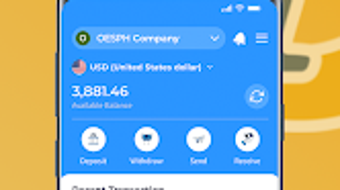
The user interface of Ole Platform is structured to prioritize simplicity and accessibility. Navigation is designed around core functions such as sending money, viewing transaction history, and managing account settings. The layout emphasizes clear icons and intuitive menu placement to reduce learning time for new users.
Workflow efficiency is supported by streamlined processes, allowing users to complete transactions with minimal steps. For example, initiating a payment typically involves selecting a recipient, entering the amount, and confirming the transaction—steps that are optimized for speed and accuracy.
Performance details were not specified by the developer. However, based on general behavior of lightweight Android applications, the app is expected to operate smoothly on modern devices. The installation size of 15.2 MB suggests a compact footprint, which may contribute to faster loading times and lower memory usage. The developer did not provide additional system requirements or resource usage data.
Stability observations are based on general software behavior patterns. No reported issues with crashes or freezes were mentioned. Users can expect consistent access to core functions during regular use, though real-world performance may vary depending on device specifications and network conditions.
Compatibility & System Requirements
Ole Platform is designed for the Android operating system. The current version is 1.2.0, released on April 15, 2024. The application has a file size of 15.2 MB, indicating a lightweight installation that requires minimal storage space.
Compatibility information was partially provided. While the app is confirmed to run on Android devices, exact minimum OS versions or hardware specifications were not listed. The developer did not specify whether the app supports older Android versions or specific device models.
Exact system requirements were not listed. Users should ensure their device meets standard Android requirements for app installation and operation. The absence of detailed compatibility details means that users may need to test the app on their specific device to confirm functionality.
Pros and Cons
Pros
- Free to download and use, making it accessible to a wide audience.
- Lightweight installation size of 15.2 MB, suitable for devices with limited storage.
- Offers secure payment processing with built-in safety features.
- Enables global access to Ole Platform account from any location.
- Provides full access to transaction history and account settings.
Cons
- Compatibility with older Android versions is not confirmed.
- Exact system requirements were not specified by the developer.
- Performance data, including CPU and RAM usage, was not provided.
- Available only on Android, limiting access for users on other platforms.
- No information on offline functionality or data synchronization.
FAQ Section
Is Ole Platform available for iOS devices?
The app is currently available only on Android. There is no information provided about future releases for iOS or other operating systems.
Is the app safe to use?
Ole Platform is designed with security features to protect transactions and user data. The developer emphasizes secure payments, though specific security protocols were not disclosed.
How often does the app receive updates?
The app was last updated on April 15, 2024. No information is available on the frequency of future updates or update notifications.
Does Ole Platform require an internet connection?
Yes, the app requires an active internet connection to access the Ole Platform account, process payments, and sync transaction data.
Can I use Ole Platform without an account?
No, the app requires a registered Ole Platform account to function. Users must create an account before using the app’s features.
Final Thoughts
Ole Platform presents a focused and secure solution for managing digital payments through a mobile interface. Its lightweight design, free access, and integration with a global payment system make it a practical tool for users seeking convenience and reliability in financial transactions. The app excels in core functionalities such as sending money, viewing transaction history, and managing account settings, all within a streamlined interface.
While limitations exist—such as platform exclusivity to Android and the absence of detailed system requirements—the app remains a viable choice for users already engaged with the Ole Platform ecosystem. Professionals and individuals who prioritize secure, fast, and accessible payment tools will find value in this application.
For those in need of a dependable mobile wallet for digital payments, Ole Platform delivers a solid experience with minimal friction. Download Ole Platform now and enjoy hassle-free transactions anytime, anywhere.







